---
title: Client Portal Verification Method Guide
description: Set up your Black Diamond security verification through email, text, or an authenticator app easily with our step-by-step guide. Secure your account today.
---
[](https://www.birchwoodfp.com/?hsLang=en)
Phone: [952-885-9088](tel:19528859088)[](https://cta-redirect.hubspot.com/cta/redirect/3811900/47770b11-5936-41e0-b9cf-9b391581cd7a)
Phone: [952-885-9088](tel:19528859088)
[](https://cta-redirect.hubspot.com/cta/redirect/3811900/47770b11-5936-41e0-b9cf-9b391581cd7a)
- [Who We Are](https://www.birchwoodfp.com/about)
- [Our Team](https://www.birchwoodfp.com/our-team)
- [Leadership Team](https://www.birchwoodfp.com/meet-our-leadership-team)
- [How We Work](https://www.birchwoodfp.com/thebirchwoodprocess)
- [Community Impact](https://www.birchwoodfp.com/community-impact)
- [FAQs](https://www.birchwoodfp.com/faqs)
- [What We Provide](https://www.birchwoodfp.com/what-we-provide)
- [Investment Management](https://www.birchwoodfp.com/investment-management)
- [Socially Responsible Investing](https://www.birchwoodfp.com/socially-responsible-investing)
- [Women & Money](https://www.birchwoodfp.com/women-and-money)
- [Charitable Giving Strategies](https://www.birchwoodfp.com/charitable-giving-strategies)
- [Retirement](https://www.birchwoodfp.com/retirement)
- [Tax Strategy](https://www.birchwoodfp.com/tax-strategy)
- [Estate & Legacy Planning](https://www.birchwoodfp.com/legacy-planning)
- [Education Planning](https://www.birchwoodfp.com/education-planning)
- [Cash Flow & Spending Plans](https://www.birchwoodfp.com/cash-flow-and-spending)
- [Downloadable Guides](https://info.birchwoodfp.com/resources)
- [The 5 Pillars of College Planning](https://www.birchwoodfp.com/college-planning)
- [Estate Planning Guide](https://www.birchwoodfp.com/estate-planning-guide)
- [Getting Organized Guide](https://www.birchwoodfp.com/guide-to-organizing-your-finances)
- [Personal Monthly Budget](https://info.birchwoodfp.com/personal-monthly-budget)
- [SRI Guide](https://info.birchwoodfp.com/sri)
- [Widows' Financial Guide](https://info.birchwoodfp.com/finances-for-one-guide)
- [Other Webinars/Resources](https://info.birchwoodfp.com/resources)
- [Blog](https://blog.birchwoodfp.com)
- [Financial Insights Blog](https://blog.birchwoodfp.com)
- [Latest News](https://blog.birchwoodfp.com/news)
- [Financial Milestones](https://www.birchwoodfp.com/milestones)
- [Contact Us](https://www.birchwoodfp.com/contact-us)
# Black Diamond Verification Methods
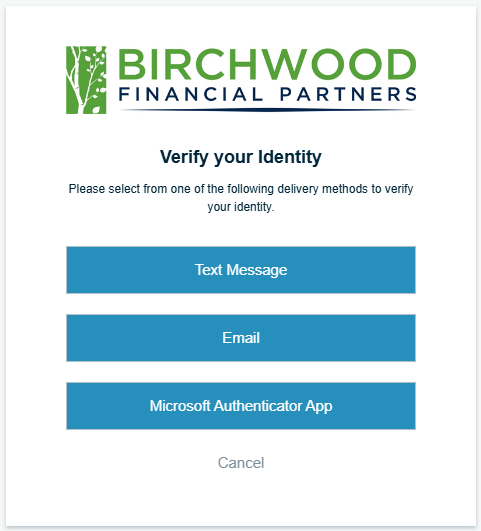
Your Black Diamond security verification is automatically set up through your email. If you prefer, you can also receive verification by text message or via an authenticator app. To add verification methods, follow the steps below.
### Access your Black Diamond Preferences
Step One: [Sign in to Black Diamond ](https://login.bdreporting.com/Auth/birchwood/SignIn)
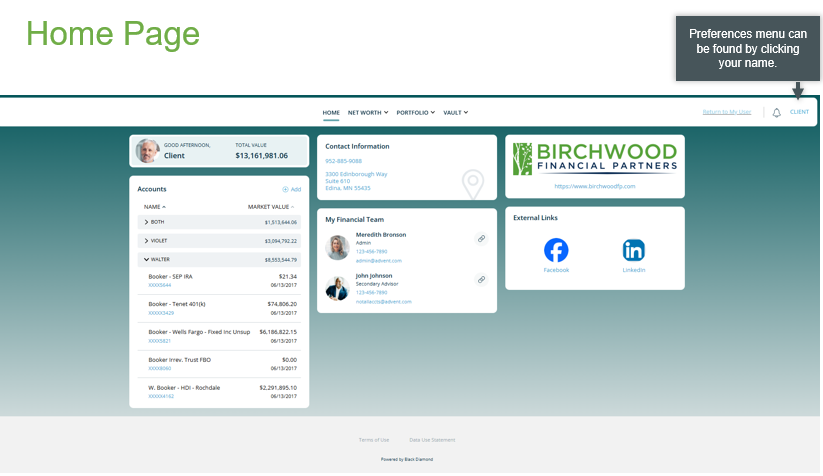
Step Two: Access your preferences by clicking on your name in the upper right-hand corner of the home page.
### To Add Text Message
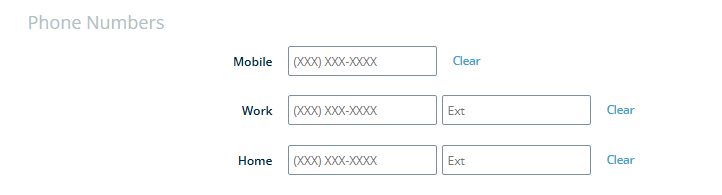
Step One: In Preferences, under the Phone Numbers section, add your mobile number.
Step Two: Click the** Save** button located in the upper right-hand corner and enter your Black Diamond password when prompted.
Step Three: There should now be a blue Verify button next to your mobile number. Click to verify via text message.

Step Four: Once you've verified your mobile number via text message. You should see a green Verified label.

### To Add an Authenticator App
Step One: Under the Authenticator App section, click Register Device

Step Two: Select the Authenticator App and Device Type you would like to use. Birchwood recommends using Microsoft.
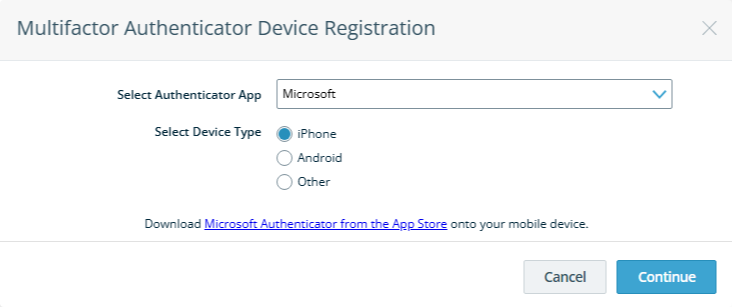
Step Three: Using your selected authenticator app on your phone, scan the supplied QR code and follow the instructions to complete setup.
-1.png?width=732&height=342&name=Copy%20of%202026%20Saints%20Game%20Image%20(1)-1.png)
### Log in to Black Diamond
You can now[ sign](https://login.bdreporting.com/Auth/birchwood/SignIn)[ in to Black Diamond](https://login.bdreporting.com/Auth/birchwood/SignIn) with your preferred authentication option.
## How-To Videos
Step-by-Step Video Instructions for Setting Up Your Online Accounts
[ ](https://www.birchwoodfp.com/hs/cta/wi/redirect?encryptedPayload=AVxigLKjoXYkc%2B%2BigfLSxQXAdj2V9dtLSlJFbTbx0P932XEjS8pbkW%2B167StcBkwfgASMy4Lhh%2FLHF3I4AQ%2B71k%2FZOEonyLUz35Ko4OvI4mSCv6hdWt4%2FpxU2SYdFhDJvWrFrnY1FkJUbWETcfuQ1gNkCBuHTz8Aklg5MynMdykRgJrPHyn7elbJw8x5I3Lk&webInteractiveContentId=174676185929&portalId=3811900&hsLang=en)
[](https://www.birchwoodfp.com/?hsLang=en)
[Home](https://www.birchwoodfp.com?hsLang=en)
[WHO WE ARE](https://www.birchwoodfp.com/about?hsLang=en)
[WHO WE SERVE](https://www.birchwoodfp.com/who-we-serve?hsLang=en)
[WHAT WE PROVIDE](https://www.birchwoodfp.com/solutions?hsLang=en)
[DOWNLOADABLE GUIDES](https://info.birchwoodfp.com/resources?hsLang=en)
[blog](https://blog.birchwoodfp.com?hsLang=en)
[Contact Us ](https://www.birchwoodfp.com/contact-us?hsLang=en)
[Form CRS](https://info.birchwoodfp.com/form-crs?hsLang=en)
[Forms ADV](https://info.birchwoodfp.com/adv?hsLang=en)
[PRIVACY POLICY](https://info.birchwoodfp.com/privacy-policy?hsLang=en)
[5601 Green Valley Dr., Ste 600](https://maps.app.goo.gl/EbBNRPP4sFfkeYZd8)
[Bloomington, MN 55437](https://maps.app.goo.gl/EbBNRPP4sFfkeYZd8)
Phone: [952-885-9088](tel:19528859088)
Email: [info@birchwoodfp.com](mailto:info@birchwoodfp.com)
All written content on this site is for information purposes only. Opinions expressed herein are solely those of Birchwood Financial Partners, Inc. and our editorial staff. Material presented is believed to be from reliable sources; however, we make no representations as to its accuracy or completeness. All information and ideas should be discussed in detail with your individual adviser prior to implementation. Advisory services are offered by Birchwood Financial Partners, Inc., an SEC Registered Investment Advisor. Birchwood Financial Partners, Inc. is not affiliated with or endorsed by the Social Security Administration or any government agency, and is not engaged in the practice of law. The presence of this web site shall in no way be construed or interpreted as a solicitation to sell or offer to sell advisory services to any residents of any State other than the States of AZ, CA, FL, IA, IL, MN, NC, NY, TX, WI or where otherwise legally permitted. All written content is for information purposes only. It is not intended to provide any tax or legal advice or provide the basis for any financial decisions.
Images and photographs are included for the sole purpose of visually enhancing the website. None of them are photographs of current or former Clients. They should not be construed as an endorsement or testimonial from any of the persons in the photograph. The inclusion of any link is not an endorsement of any products or services by Birchwood Financial Partners, Inc. All links have been provided only as a convenience.
© 2026 Birchwood Financial Partners. All Rights Reserved.
[Disclaimer ](https://www.birchwoodfp.com/disclaimer?hsLang=en)[Legal, privacy, copyright and trademark information](https://www.birchwoodfp.com/legal-privacy-copyright-and-trademark-information?hsLang=en)